When a Markdown Editor Remembers LOGO
There is a particular kind of software nostalgia that still earns its place: LOGO's turtle, reduced to movement, repetition, and a trail left behind.
zago brings that idea into a terminal Markdown editor. It is written by zonble, and the interesting part is not a separate graphics window. The text buffer itself becomes the canvas.
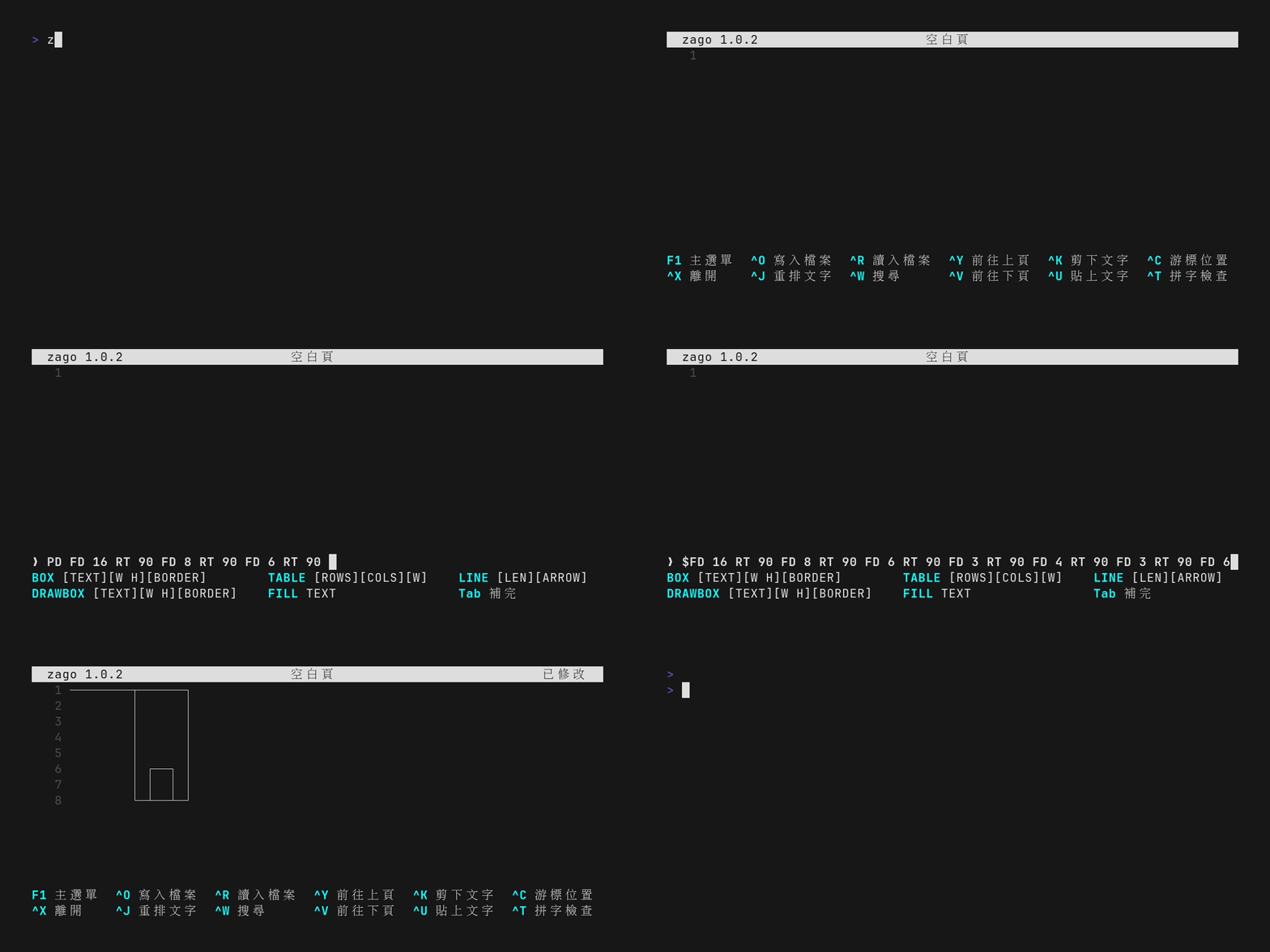
The pen is a text-buffer mode
zago's Editor LOGO uses the familiar PD and PU commands:
PD— pen down; movement leaves line-drawing characters in the buffer.PU— pen up; movement becomes safe navigation again.FD— move forward in the current direction.RTandLT— turn right or left by 90 degrees.
When the pen is down, zago does more than print independent characters. It merges horizontal and vertical strokes into Unicode junctions such as ┌, ┐, └, ┘, and ┼. That makes a sequence of cursor movements behave like a small diagram editor while the result remains plain text.
The default is deliberately safe: LOGO execution starts with the pen up. A macro has to opt into drawing explicitly, and a finished drawing should lift the pen again.
A small polygon instead of BOX
The official pen-mode guide already demonstrates a square with BOX-like movement. For this recording I used a stepped octagon so the demo shows turtle movement without repeating that example:
PD FD 16 RT 90 FD 8 RT 90 FD 6 RT 90 FD 3
RT 90 FD 4 RT 90 FD 3 RT 90 FD 6 RT 90 FD 8 PU
zago's turns are 90-degree turns, so this is not a graphical regular octagon. It is an orthogonal text polygon: a sequence of straight moves and right-angle turns that closes back on itself. The shape is less important than the mechanism — the turtle moves, the buffer records the path, and junction characters are fused as the path changes direction.
The same command can be tested without opening the editor:
zago -e 'PD FD 16 RT 90 FD 8 RT 90 FD 6 RT 90 FD 3 RT 90 FD 4 RT 90 FD 3 RT 90 FD 6 RT 90 FD 8 PU'That headless mode is useful for checking a drawing before putting it into an interactive recording. It also makes the output easy to inspect in a shell or pipeline.
Recording the interaction instead of recording it again
I used Tapedeck to turn the terminal session into a repeatable .roll script. The script is named examples/tui_zago_logo_turtle.roll in the Tapedeck repository and describes the boring parts explicitly:
Set Engine Auto
Set Output "zago_logo_turtle.gif"
Set FPS 15
...
Escape
Type "PD FD 16 RT 90 FD 8 RT 90 FD 6 RT 90 FD 3 RT 90 FD 4 RT 90 FD 3 RT 90 FD 6 RT 90 FD 8 PU"
Enter
tapedeck run --dry-run examples/tui_zago_logo_turtle.roll passes the parser and selects the VHS engine. Running the script produced a 1200×600 GIF with 251 frames in the local recording environment. The output is a terminal capture, not a claim that zago opens a graphical turtle canvas.
That distinction matters. zago owns the editor and the LOGO language; Tapedeck only makes the interaction reproducible. If the recording needs a new shape later, the script is the source of the demo instead of a sequence of manually timed keystrokes.
A small downstream contribution
I also maintain aur-zago, an Arch Linux packaging project for zago. The intended AUR package name is zago-bin; it is not published in the AUR yet because new account registration is currently unavailable to me. This is downstream work, not zago development. I packaged it because I am a fan of zonble's project and wanted a convenient Arch installation path; the zago design, implementation, and authorship remain zonble's.
That boundary is worth stating plainly when writing about tools one did not create. Packaging, recording, and documenting a project can be useful without turning into an ownership claim.